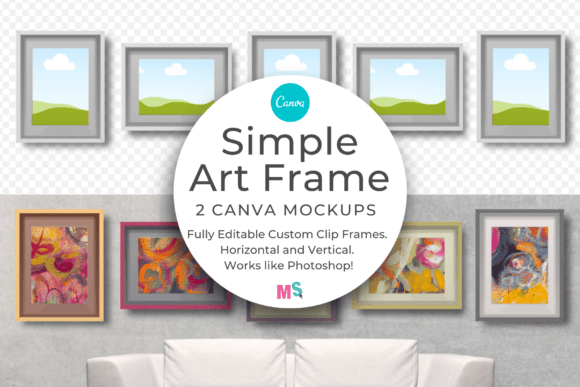
Elevate Your Designs: The Simple Art Frame Mockup for Canva
When you’re selling digital art, printable quotes, or photography online, the presentation is half the battle. A flat JPG file sitting on a white background rarely inspires a buyer to click "Add to Cart." They need to visualize the work in their own space. This is where the Simple Art Frame Mockup for Canva becomes an indispensable part of your design toolkit. It bridges the gap between a digital file and a tangible product, offering a clean, versatile canvas for your creativity.
The Power of Visual Context in Branding
As a designer or entrepreneur, you understand that brand identity relies heavily on consistency. Whether you are curating a Pinterest board, updating an Etsy shop, or presenting a proposal to a client, the frame around your art changes the perception of the work itself. A heavy gold frame suggests tradition and luxury, while a thin, minimal frame speaks to modern typography and contemporary aesthetics.
This specific mockup set focuses on simplicity. It doesn't distract from your art; it supports it. The visual style is clean and neutral, making it a perfect partner for a wide variety of projects. Think of it not just as a frame, but as a stage. By using this Simple Art Frame Mockup for Canva, you are taking control of the narrative, ensuring that your graphic designs or watercolour paintings are viewed exactly how you intend them to be seen.
Practical Applications for Creatives
The versatility of this mockup allows it to function across different creative sectors. It is a robust design asset that adapts to your needs. Here is how different professionals can leverage this tool:
- For Digital Sellers: If you sell printable wall art on Etsy or Shopify, showing the piece "hanging" on a textured wall or against a specific color background helps the customer visualize the scale and vibe. It turns a digital download into a home decor item.
- For Photographers: Use the horizontal format for landscape photography and the vertical format for portraits. The ability to edit the frame colors means you can match the frame to the dominant tones in the photograph, creating a cohesive editorial design look.
- For Brand Strategists: When creating social media graphics or packaging design concepts, frames add a layer of sophistication. You can use the mockup to display logo concepts or display font specimens in a client presentation to show how the branding might look in a real-world setting.
- For Bloggers and Content Creators: Create a cohesive aesthetic for your Instagram grid or blog headers. Framed quotes or clip art compositions look significantly more professional when placed within a structured mockup.
Design Flexibility: Beyond the Standard Display
One of the standout features of this particular product is the color-editable nature of the frames. In the world of web design and marketing, color theory is paramount. A clash between your art and the frame can ruin the composition. With this Simple Art Frame Mockup for Canva, you aren't stuck with a generic black or white border.
You can select a inner and outer frame color that complements your specific piece. For example, if you are showcasing a script font wedding invitation, you might choose a soft champagne frame. If you are presenting a bold sans serif font poster, a stark black or deep navy frame might provide the necessary contrast to make the typography pop. This level of customization ensures that the mockup serves the art, rather than forcing the art to fit the mockup.
Streamlining Your Workflow with Canva
For many modern creatives, Adobe Photoshop is no longer the daily driver. Canva has democratized graphic design, allowing entrepreneurs and hobbyists to produce professional-grade content without a steep learning curve. This mockup is built specifically for that environment. It functions similarly to Photoshop smart objects but utilizes Canva’s user-friendly interface.
The workflow is designed to be frictionless. Once you access the template, you simply drag and drop your images into the designated frames. The shadows and lighting are already baked in, meaning you get that realistic, 3D look instantly. This efficiency is vital for small business owners who need to produce high-volume content—like daily social media posts or weekly blog headers—without spending hours on photo editing.
Evaluating Project Fit and Commercial Use
When selecting design assets, it is crucial to consider the licensing and the intended application. This mockup is excellent for both personal projects and commercial use. Whether you are a hobbyist displaying your surface patterns or a professional agency creating a mood board for a high-end client, the tool is equipped to handle the task.
However, consider the "personality" of the frame. Because it is described as "simple," it leans towards minimalism. It is likely the best fit for modern typography projects, Scandinavian-inspired interiors, or clean corporate branding. If your art style is baroque, highly ornate, or vintage, you might need to experiment with the frame colors to ensure the simplicity doesn't look out of place. Often, a simple frame can actually ground a busy piece of art, providing a visual resting place for the eye.
Tips for Better Visual Hierarchy
Using a frame effectively contributes to visual hierarchy. Here are a few tips to get the most out of your mockup:
- Match the Background: Use the background color options to create a monochromatic look (using different shades of the same color) for a sophisticated, high-end feel. Alternatively, place the frame against a contrasting texture to make it pop.
- Consider the Pairing: If your art features a heavy, bold display font, a thin frame provides a nice balance. Conversely, delicate line art might benefit from a slightly thicker frame to give it weight.
- Readability: Ensure that the frame color does not bleed into your art. If you have a white background on your print, ensure the frame has a distinct outline or shadow so the edges of the paper are visible.
Ultimately, the Simple Art Frame Mockup for Canva is more than just a digital file; it is a presentation strategy. It allows you to show up professionally, present your work with confidence, and help your audience see the true potential of your designs hanging on their walls. By integrating this into your workflow, you elevate the perceived value of your digital products instantly.